Jupyter notebook使用方法
1. 启动Jupyter notebook
Ubuntu 20/22/24 主机
- 激活虚拟环境
- 启动Jupyter. [务必使用以下命令启动]
Windows 主机
以tf115-py37-cuda100虚拟环境为例:
- 在命令提示符中切换到需要的环境并激活
- 在虚拟环境中启动jupyter notebook
- 在浏览器中,选择项目打开后,在Kernel 菜单中切换到
tf115-py37-cuda100环境
2. 获得远程访问地址
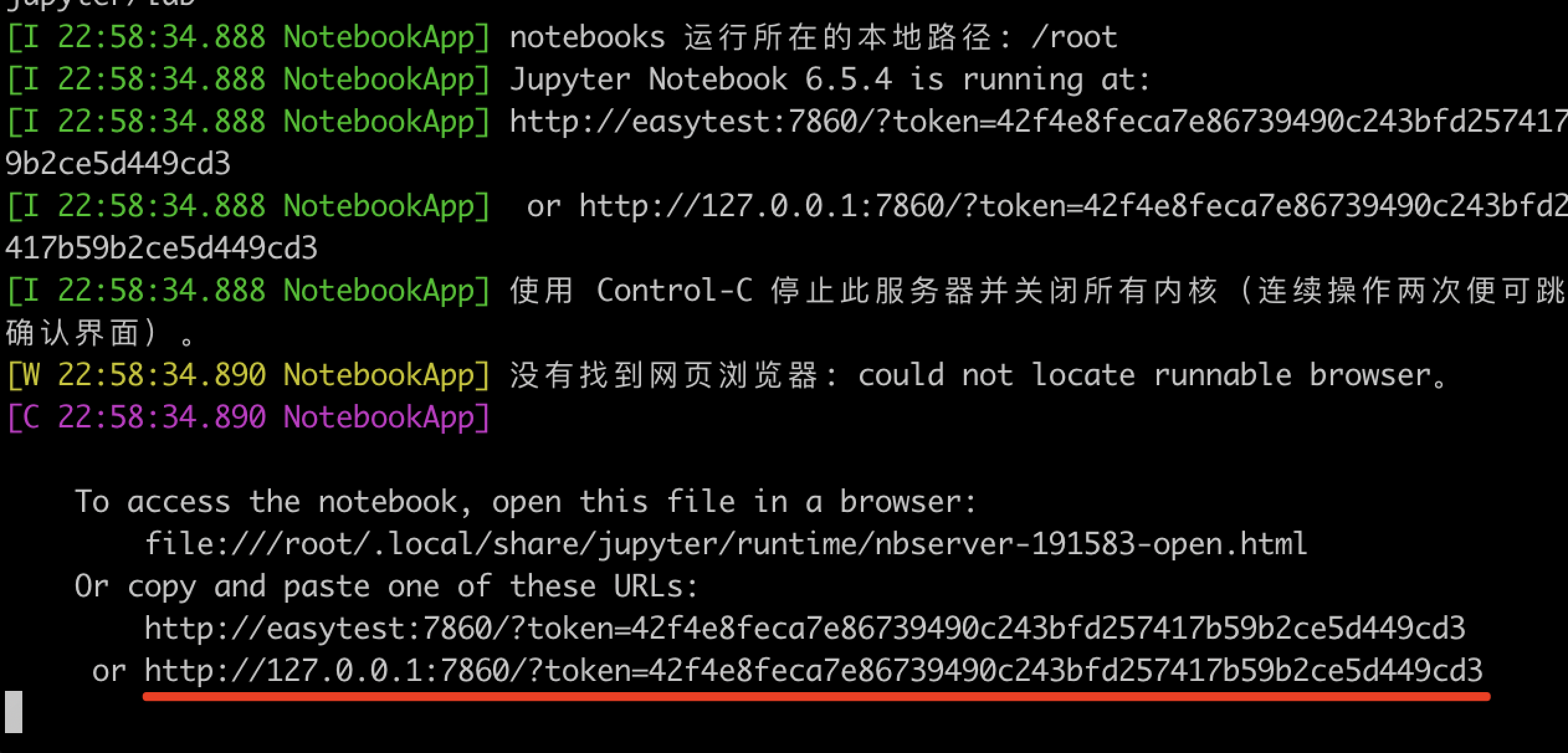
- 找到红线的位置的URL
http://127.0.0.1:7860/?token=42f4e8feca7e86739490c243bfd257417b59b2ce5d449cd3,将这个内容复制下来。 - 联系客服,将前面复制的内容发送给客服,开通Jupyter远程访问。
- 客服会给到您一个类似 http://hbyc-n2-ixx.easy-ai.cloud:8800/?token=42f4e8feca7e86739490c243bfd257417b59b2ce5d449cd3 的URL,输入到您的浏览器中,就可以使用了。
3. 重要提示
- http://127.0.0.1 这样的地址只能在租用的设备上访问租用设备本身,你自己的电脑不能通过该地址访问到你租用的设备.